Dancing Segway / 2026
A little rhythm.
A lot of control.
Turning sound and tilt into movement, one experiment at a time.
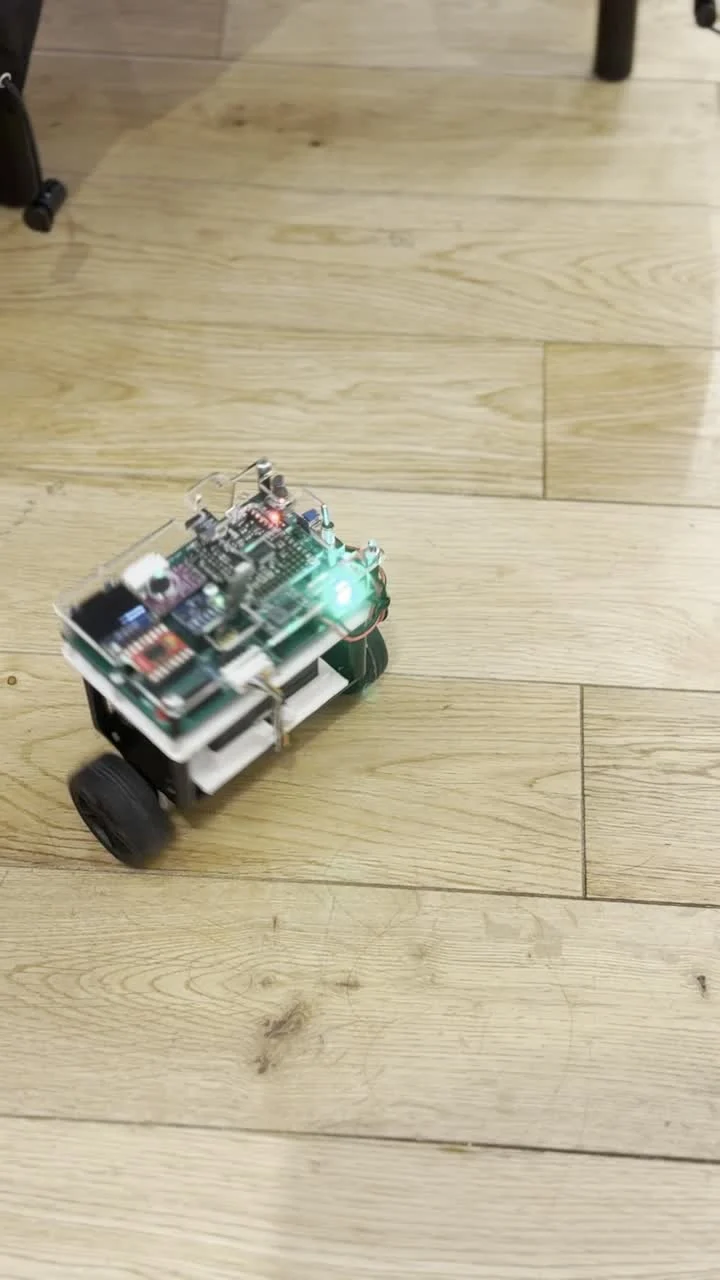
A two-wheel robotics project exploring beat-driven choreography and feedback control on a MicroPython platform. From the first LED pulse to a moving physical prototype.
Two control experiments.
One physical platform.
01 / Program the rhythm
Eight instructions.
A dance on repeat.
The choreography lives in a tiny text file: FBFBLRLR. The robot reads the sequence before starting, then executes the next command whenever it detects a beat.
Tap a beat to advance the sequence, or choose an individual step.
Ready for a beat
8 steps / loops back to the startReady for a beat.
This browser demo steps through the saved commands. The physical robot uses microphone input.
Movement persists between beats. The dance program keeps the latest motor command until another instruction arrives.
Choreography is editable. Forward, backward and turning commands can be rearranged; S and . are also supported as stop/rest instructions.
02 / Listening for a change
When sound
becomes a cue.
The detector compares the energy of a short audio window with a rolling background level. A sudden rise becomes a candidate beat; a time gate prevents closely spaced detections.
Read the dance controller ↗- 01Sample
Capture at 8 kHz.
A timer interrupt reads the microphone every 125 µs and subtracts the configured DC offset.
- 02Measure
Collect 160 samples.
Sum the squared sample values across a 20 ms window, then compare with 50 recent energy windows.
- 03Decide
Look for a rise above 2.5×.
The current-to-average energy ratio must exceed 2.5, with more than 150 ms since the last accepted beat.
- 04Act
Move one step. Flash the LEDs.
The next character sets both motor outputs. A brief 60 ms LED pulse makes the detection visible.
The dance script first fills its 50-window history—nominally one second of audio—before enabling beat-triggered motion.
03 / A separate balance experiment
Read the lean.
Correct the wheels.
The balance controller turns pitch error into a shared motor command. It combines proportional response, accumulated error and the rate of pitch change, with limits on the integral and output.
u = Kp · error + Ki · ∫error − Kd · pitch_rate↺ The next pitch reading closes the loop.
Separate control from display.
The loop requests a minimum 5 ms interval, while the OLED refreshes every 200 ms. That gives tuning feedback without redrawing the screen on every control update.
Limit the accumulated error.
The integral is clamped to ±25 and the motor command to ±80. A configured small-command dead zone reduces tiny corrections.
Stop beyond 35°.
If the absolute pitch exceeds 35°, the script stops the motors and clears the integral. This is a programmed cutoff, rather than a measured stability envelope.
The supplied archive contains separate dance and balance programs. Hall sensors support wheel-speed experiments and display feedback; the final balance script controls pitch directly. The footage documents prototype motion, without establishing simultaneous beat-following and balance performance.
04 / Build the behaviour in stages
Five challenges.
One learning curve.
The saved programs show a progression through sensing, motor response, wheel feedback, choreography and balance control. Each stage makes another part of the system observable.
- 01Audio → light
Make the beat visible.
Microphone energy becomes an LED response. Two detector variants explore a rolling energy ratio and peaks above a smoothed baseline.
- 02Orientation → motor command
Give tilt a direction.
Accelerometer and gyroscope readings feed a complementary filter. Pitch and roll are mapped to motor commands, with a small neutral zone.
- 03Hall pulses → PI correction
Close the speed loop.
Wheel pulses provide feedback for tilt-based speed targets. Several saved iterations record the work on proportional–integral control and motor response.
- 04Detected beat → next instruction
Put movement on the beat.
A text file holds the choreography. Each accepted beat advances one instruction and briefly flashes the LEDs.
- 05Pitch error → PID correction
Work towards upright balance.
A separate controller reads pitch, estimates its rate of change and adjusts both motors. Slower OLED updates expose the values used during tuning.
05 / What the project leaves behind
From code
to a moving system.
I contributed to system development, testing and movement behaviour, helping translate sensor input into a physical response.
Built on the Pyboard / PyBench teaching platform. The supplied audio and motor libraries credit Peter Y K Cheung, Imperial College London.
Make behaviour visible.
LED pulses, OLED values and direct motor tests make it easier to connect what the robot does with what the controller sees.
Design around different timescales.
Audio sampling, beat decisions, motor control and screen updates need different schedules. Keeping those responsibilities clear is central to the project.
The next integration step.
Combining beat commands with a balance controller would need a shared motion strategy and measured tests of timing, stability and recovery.